 |
welcome, guest |
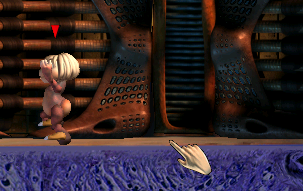 |
The body data for my Ettin youths seems to be messed up for some reason. Kind of annoying... Not sure how long it's been like this. It's fine on all the other life stages. |
|||
 |
I have the yettins, but I don't seem to have the junk data (nothing ending in 23a in my BD folder). Found a couple of the images had ended up in the BD folder, though. | |||
 |
My yettins work fine, although the images are somewhat incomplete. No BD explosions here! | |||
 |
Ehehehe, I also did the Yettin install. Good to know of this 'problem'! I'm worried if I delete the junk, my Yettins won't work :/ Also, I wanna gush about how I love Yettins :3 | |||
|
I did and female BD exploded... Males did too, for only one age. what is going on | |||
 |
If you delete just the junk BD that came with the yettins, you should be fine. Though granted, the female ettins lack BD by default anyway (they use the same BD files as the males). | |||
|
I just installed the yettins, so that would explain things. If I delete them, will it go back to normal? Or will they explode due to lack of data? | |||
|
Do you have the Yettins installed? For whatever reason, some of the .att files included with them are installed into the female Ettin A slot (which is occupied by the default ettins) instead of the proper slot. Considering that the default ettins lack youth body data (it re-uses the same BD from the adolescent stage) while the yettins do, you probably didn't get a "file overwrite?" notice when you installed the yettins. To fix it, you'll need to find the files labeled " (letter)23a.att " in your Body Data folder and delete them. I've forgotten the exact letters since it's been a while since I last installed the yettins, but if you still have their .zip file around, look in the .att folder included in the .zip and look for the .att files that end in "a" instead of "n," and then find those files in your body data folder and delete them. | |||
 |
Besides the slightly wrong positioned foot, it looks fine to me. It covers the face. | |||

| downloads cobs adoptions creaturelink metarooms breeds gallery art wallpaper screenshots graphics promos sprites |
dev hack shack script reservations dev resources active projects dev forum community links advice chat polls resources |
creatchi forum bookmarks general news help development strangeo survivor |
mycaves log in register lost pw |
0 online |
| creatures caves is your #1 resource for the creatures artificial life game series: creatures, creatures 2, creatures 3, docking station, and the upcoming creatures family. contact help privacy policy terms & conditions rules donate wiki |
||||