 |
welcome, guest |
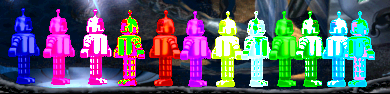 |
Good news: Rotation and swap are the only things stopping me from figuring out tints right now. Bad news: they're doing a great job of it. Sorry Clohse, but if you want me to post a tutorial, you might have to wait for another Ice Age or two before I figure this out. These robots are tinted in 3 groups of 4, with the first group having a blue base, the second having a red base and the third having a green base. The first robot in each group has rotation and swap set at 1. The second has rotation set at 1 and swap at 0. The third has rotation at 0 and swap at 1. The fourth has rotation and swap both at 0. |
|||
 |
Indeed, that goes for both, Creatures and agents. Direct tint is easier to create the right shade, but swaps and rotations look more natural (if not exaggerated). | |||
 |
Ok I see. So it is possible to get the color combo to look more natural  I might have to play around with that I might have to play around with that | |||
 |
Well, in this case it is because I was working with extremes, so it was just a whole bunch of one color, not mixed or softened by other colors, and not rotated or swapped to get anything beyond the base color. | |||
|
Why do they always turn out so bright and not blended? Just curious... | |||
|
I was just using "tints" to refer to everything referenced by the tint command With the help of a CDR article I found last night, I think I understand everything except for why setting rotation or swap to 0 or 256 causes weirdness. Before writing a tutorial or anything like that, though, I want to find some good resources to link to, and maybe a few pictures to help explain. | |||
|
Tints are easy. They are red, green and blue values which are just added or subtracted to each pixel, larger than 128 being added and lower than 128 being subtracted. Rotations and swaps... Not sure to be honest, I believe they shifted the colors of each pixel, something like red becoming first yellow (=red+green) and then green and blue turning from pink (=red+blue) to red or sumthin. To understand it, you should go for "normal" values (+-100 from 128 ), those peak values of 1, 0 and 255 are just oddities created by overflow or something sumilar. Not sure about the exact color combinations and the directions. | |||
 |
This is a great reference photo for colors in game
| |||

| downloads cobs adoptions creaturelink metarooms breeds gallery art wallpaper screenshots graphics promos sprites |
dev hack shack script reservations dev resources active projects dev forum community links advice chat polls resources |
creatchi forum bookmarks general news help development strangeo survivor |
mycaves log in register lost pw |
0 online |
| creatures caves is your #1 resource for the creatures artificial life game series: creatures, creatures 2, creatures 3, docking station, and the upcoming creatures family. contact help privacy policy terms & conditions rules donate wiki |
||||